---
category: [Administration & Integrations, Administration & Integrations/Workday API, Platform and Product Extensions, Platform and Product Extensions/Integration, Administration & Integrations/Custom Integrations & Apps, Platform and Product Extensions/Workday Extend]
keyword: [Business Process, BP, Extend BP, Extend Pro, Subprocess, Orchestration, Model Component BP, BP Event]
nav: wcp_docs
parent_url: /wcp_docs/
title: Business Process REST APIs
layout: subsection
---
## Overview
The Business Process REST service enables applications to interact with business process data for:
- Workday-delivered business processes, which are managed through the Business Process Framework in the Workday application where administrators create definitions based on Workday-delivered types. For more information, see [Setup Considerations: Business Processes](https://doc.workday.com/admin-guide/en-us/manage-workday/business-processes/business-process-framework-concepts/khy1593557050505.html?toc=6.0.0).
- Extend business processes, which are created in App Builder on the Developer Site. An Extend business process facilitate unique business workflows associated with an app’s business objects and pages for routing the event steps. Use App Manager in the Workday tenant to manage Extend business process definitions and policies. For more information, see [Business Processes in Extend Apps](/wcp_docs/GUID-c5613e86-0c6e-4537-a747-b47814a784a3-enHYPHENus.html).
Whether a business process is Workday-delivered or created for an Extend app, its data entity relationships are the same. This diagram illustrates the relationships between a business process type and its policy, definitions, events, and event steps.
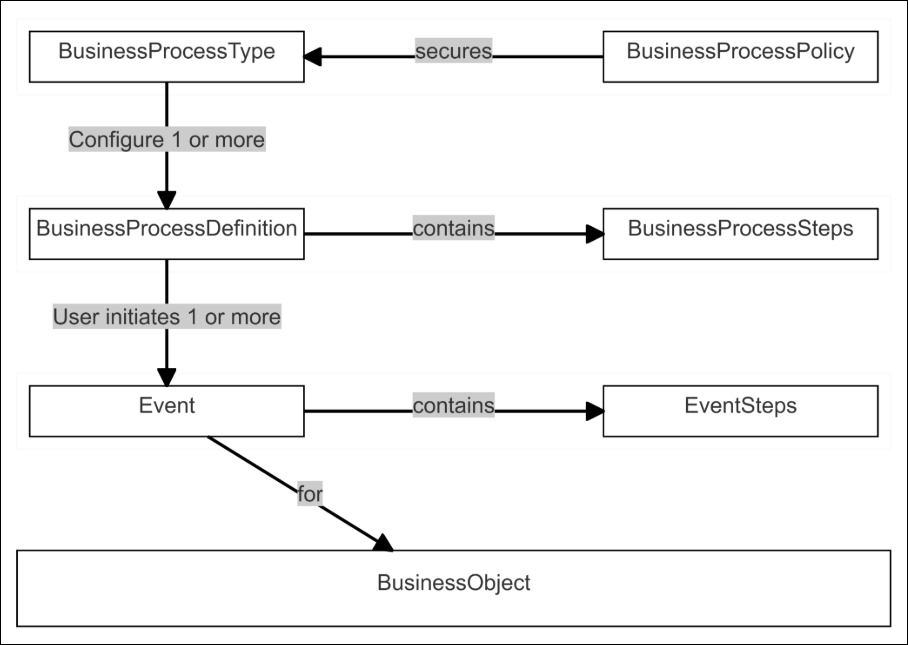
A business process definition is configured based on a business process type and is secured by a business process policy. When a user initiates a business process, the framework creates an event record (an instance of the definition and its steps). Based on the definition and policy, the event steps are routed to the appropriate users' inbox.
A business process event is initiated when:
- For a Workday-delivered business process, a Workday UI task or `POST` endpoint in a Workday REST API starts the business process.
Examples: `POST /workers/{ID}/jobChanges` in the Staffing service and `POST /workers/{ID}/requestOneTimePayment` in the Compensation service.
- For an Extend business process, the `POST` endpoint in the app-specific Extend Business Process Event REST API starts the business process.
Example: `POST /apps/myExtendApp_myAcct/v1/CreateCharityEvents`.
After the business process has been initiated, you can use the Business Process REST APIs to get information or perform actions on the business process events and event steps.
## Events
The Events REST APIs in the Business Process REST service enables apps to:
- Get information about in-progress steps or the overall status of business process events.
- Cancel and rescind business process events.
See [Events REST APIs](/wcp_docs/GUID-0df5cd55-e578-43d3-b58f-ae98825d1df0-enHYPHENus.html).
## Event Steps
The Event Steps REST APIs in the Business Process REST service enables apps to:
- Get information about the event steps of processes.
- Perform operations such as Approve, Deny, Submit or Send Back on business process event steps.
See [Event Steps REST APIs](/wcp_docs/GUID-94cb4185-fabd-4dd5-b391-6aefe9672e32-enHYPHENus.html).
## Business Process Types
The Types REST APIs in the Business Process REST service enable applications to get a list of all business process types.
To get a specific business process type for Workday-delivered business processes, you’ll need to get its Workday ID from the Workday UI. You can use the Find Events report to search the business process name. On the Business Process Name , click the Related Actions menu, and view its Integration ID.
For reference documentation about the `types` REST APIs, see `businessProcess/types` in the [REST API Explorer on the Developer Site](https://developer.workday.com/rest-api-explorer) or [Workday REST Services Directory](https://community.workday.com/sites/default/files/file-hosting/restapi/index.html?lang=en-us).
## Tutorials and Sample Apps Using Business Process REST APIs
- [Tutorial: Model Components: Business Processes](https://wd5.myworkday.com/workday/learning/course/8217842f19801001bb98eac6f24c0000)
- [Tutorial: Trigger Real-time Integrations from Workday Events](https://wd5.myworkday.com/workday/learning/course/966ed3678d78100107b79cd911550000?type=9882927d138b100019b928e75843018d)
- [Tutorial: Trigger Extend Orchestrations from Workday Business Processes](https://wd5.myworkday.com/workday/learning/course/ba277c668b5b1000cb2db39961770000?type=9882927d138b100019b928e75843018d)
- [App Catalog: Create a Work Event](https://developer.workday.com/app-catalog/createAWorkEvent)